Sale
Back to School Promo - Get $60 Off Playground!

From December 1st, 2025 through January 4th, 2026, you can experience the Winter Wonders Event on Nex Playground + Play Pass.
This Advent calendar-inspired experience brings the magic of the season to your living room. Log in daily, complete a quest, and earn a trophy to place on your very own winter island. But these aren’t just regular ol’ rewards—these trophies come alive with the magic of play!
The experience includes a tutorial to help you learn the ropes. But if you run into questions, or just want to better understand how it all works, keep reading for more details, tips, and tricks.
Ready to create your own winter wonderland? The first step is to make sure Playground is fully updated by connecting to WiFi, then select the Winter Wonders game tile and complete the tutorial.
Heads up: the tutorial is designed to take about 8 minutes to complete (this time includes playing your choice of song in Starri).
Keep in mind—there is only one island to decorate in this experience, so you are sharing this snowy wonderland with your family. Work together to complete quests and unlock trophies, then create a winter world the whole family can love and enjoy.
1. Open and close your hand to drag and drop your trophies.
The trick here is to keep your hand visible, palm facing the TV, for the most accurate movements.
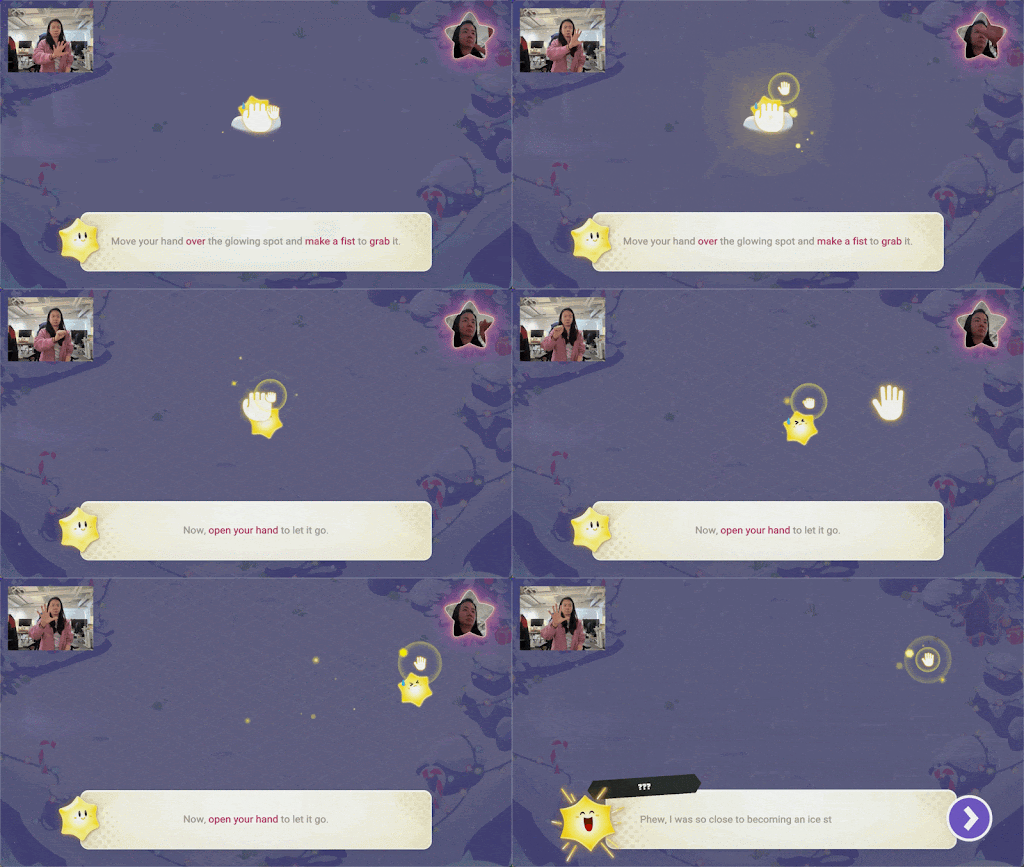
2. Bring your trophies to life with a wave of your hand.
Hover your hand over a trophy (palm towards the TV) for an extra special animation.
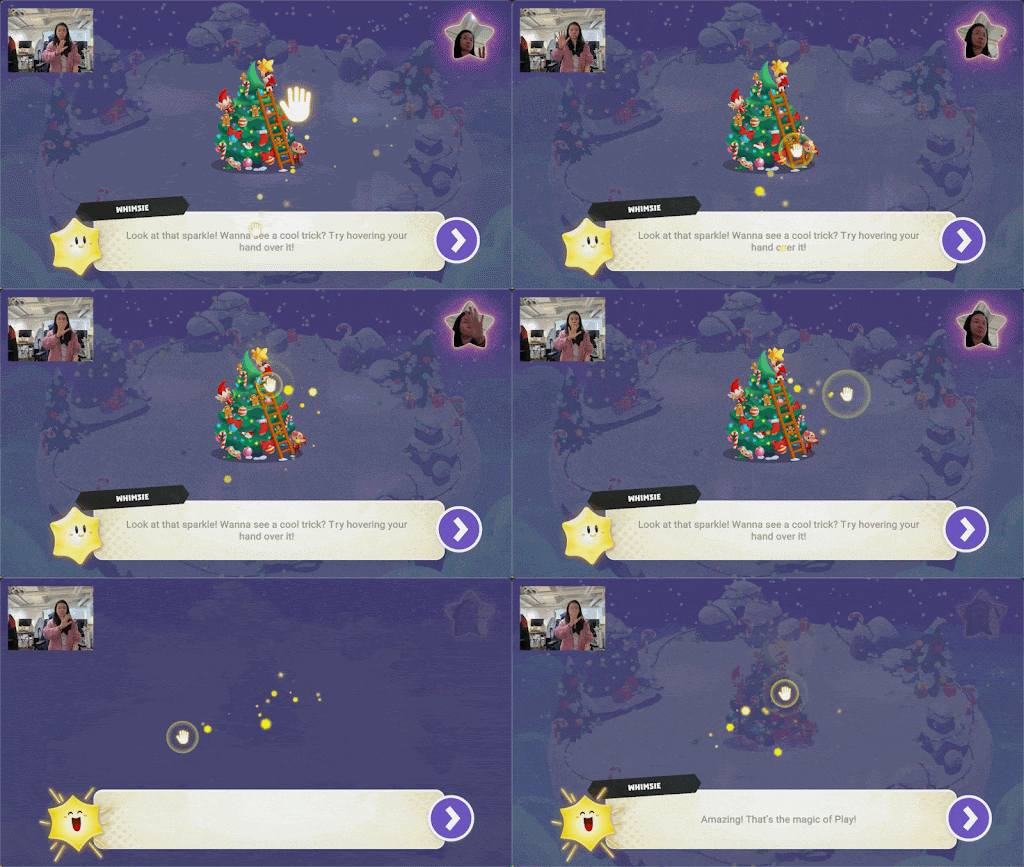
3. Placing and discarding your trophies.
Navigate your open hand to the trophy you wish to move, then close your hand to grab it. Change the trophy’s location (or if discarding, move it off the island), then open your hand to release and place it.
4. Make a copy of your trophy.
Use your remote to choose the trophy you want to duplicate, then press the remote’s CENTER button to add it to your island.
Once you’ve got these skills down, you’re on your way to creating the most chaotic, beautiful, and festive island you’ve ever seen.

After completing the tutorial, you can quickly fill up your island with just the first two trophies you earn. But then what?
1. Be sure to come back the next day to complete the next quest and earn a new trophy. A new quest will unlock every day between December 1st and December 25th.
But good news—if you miss a few days, you have through January 4th to complete those quests and earn their trophies.
2. Out of room on your island? If you duplicated your trophies a few too many times, you can either remove trophies as described above, or reset your entire wintery space by hitting the BACK button on the remote and then selecting “Clear the island”.
3. Even though the experience only shows right-handed instructions, this game supports both right and left handed players. We recommend using your dominant hand to navigate moving and placing your trophies, and using the remote in your other hand as needed.
4. After the event ends, your island and unlocked trophies will still be available to decorate and explore. The game tile will be found at the bottom of the Playground Home screen.
This is a brand-new type of experience, so you likely have more questions. Trying checking out this list to find your answer.
Still not sure about something? You can join our Nex Champion’s Community to chat it out with other players, or contact our Customer Service team if something is not working correctly.
Q: Who can join the event?
A: The event is exclusive to Play Pass. If you don’t yet have Play Pass, you can sign up directly on your device, or buy one here.
Q: How do I get a Trophy?
A: Complete your daily quest to earn a Token, then use the Token to open the Play Box — and unlock a new Trophy from there by clicking “Claim”. That’s how your new Trophy appears!
Q: How do I play each day’s mission?
A: Enter Winter Wonders to see that day’s quest. Then navigate to the game and complete the mission to earn your token.
Q: Can I choose which Trophy I get?
A: After the tutorial, each Play Box gives you a surprise, random trophy. But you can follow along in the Nex Champion’s Community to see what everyone else is getting.
Q: How long do quests take?
A: Missions are designed to be short, around 3–5 minutes (perfect for a quick play session).
Q: I joined late. Can I still do earlier missions?
A: Absolutely. Everyone can catch up. After you join and complete the tutorial, all past quests unlock automatically. You can finish them in any order by Jan 4th—so no one misses out on the festive fun.
Q: Will I lose progress if I skip a few days?
A: Nope. Quests stay unlocked even if you miss a day. You can continue whenever you want—just be sure to finish all 25 quests by Jan 4th.
Q: When do daily quests reset?
A: New daily quests become available every day at 10:00 UTC. That’s 2 AM Pacific / 5AM Eastern time.
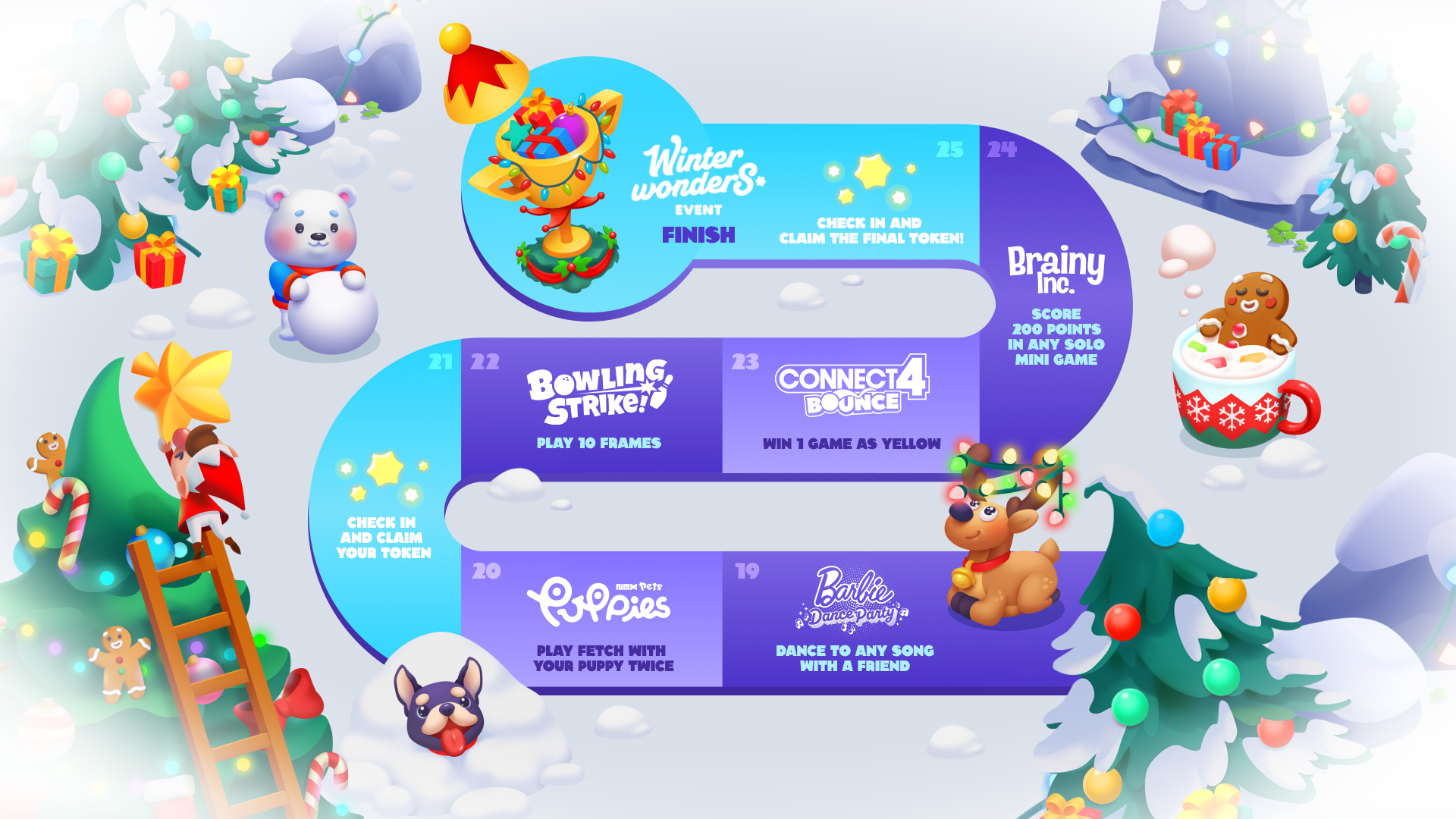
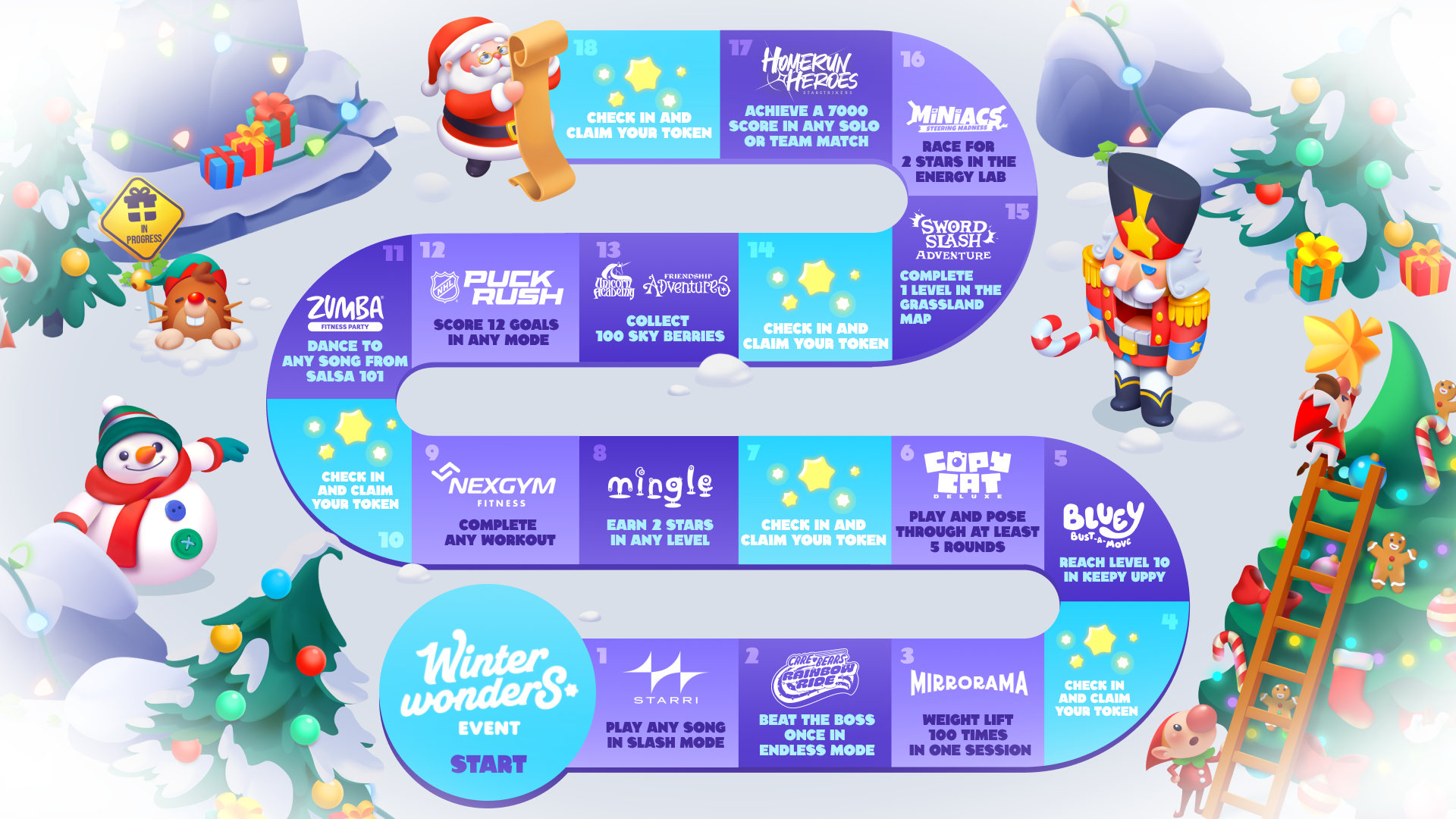
Q: Can I find out the full list of quests?
A: Check out this cute game board visual for a look at each day's quest:
Q: Can I rearrange or decorate my Winter Island?
A: Yes! You can move your trophies, or send them back to the Inventory. Just hover your hand over the trophy you wish to move, close your hand to grab it, and customize your Winter Island however you like.
Q: What happens when I finish all 25 trophies?
A: You’ll unlock a special 26th Trophy for finishing the full Winter Wonders set. Then continue decorating your island to create the winter scene of your dreams.
Q: Can I get a trophy without completing a game-related quest? I don’t want my kid to play today’s game.
A: Unfortunately not. If you don’t want to play a particular game, simply skip that day and come back tomorrow for another quest. You won’t be able to complete your collection, but you can still build an impressive amount of trophies.
Q: The game says I already finished a quest, but I don’t remember doing it. Why?
A: Sometimes you might complete a quest if you play the participating game after that quest was unveiled (even if you didn’t see it yet). When this happens, you still get your trophy, and you’ll see a popup to let you know you’ve earned it.
Q: My Trophy didn’t appear after finishing a quest. What’s going on?
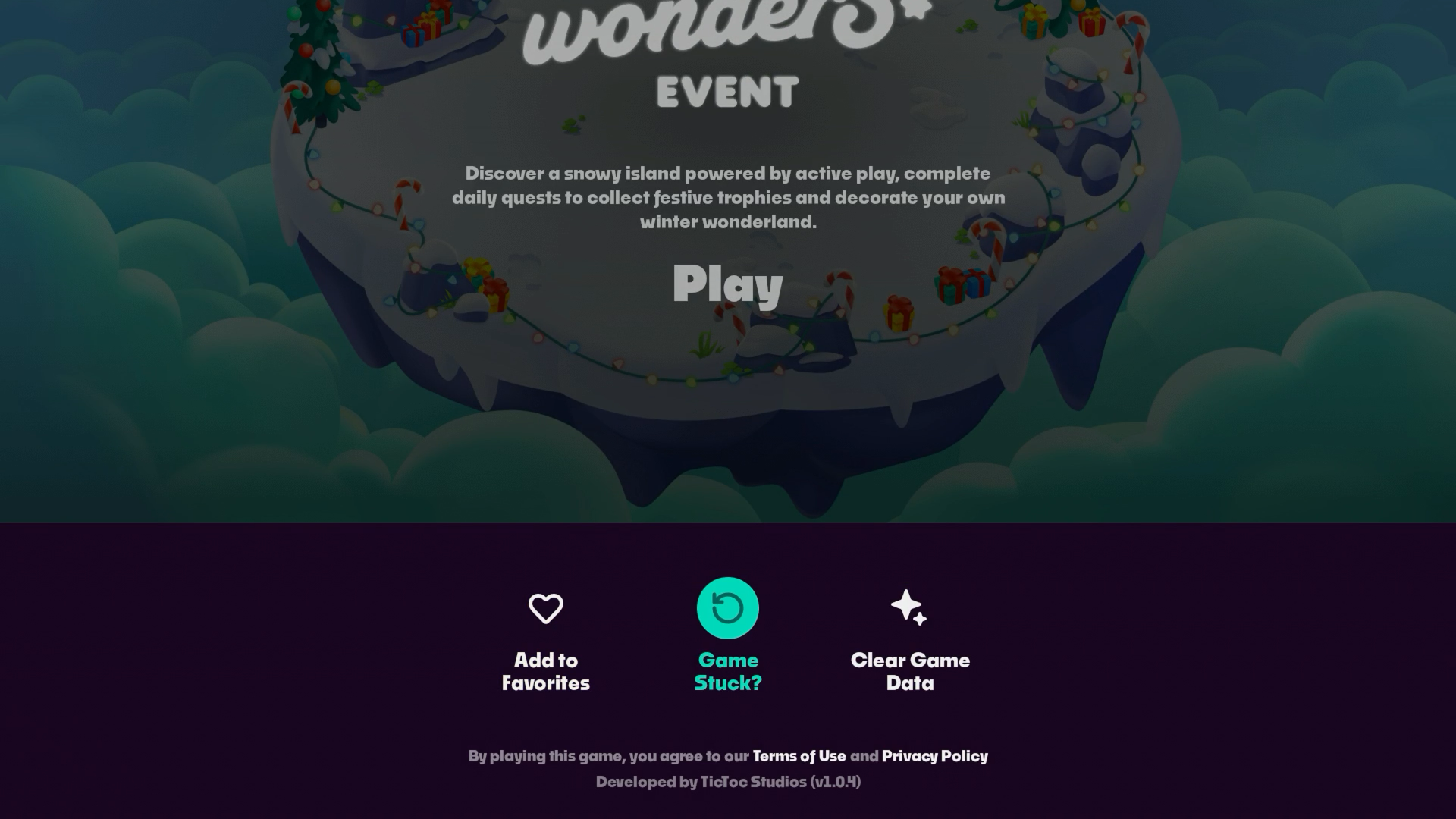
A: Click BACK or HOME on your remote control to exit the event, then re-enter the game. But don’t press play yet. Instead, click DOWN on your remote and select ‘Game stuck?’. Don’t worry—this won’t reset all your progress.
HINT: If the quest you're having trouble with is the Bluey Keepy Uppy challenge, make sure to finish the round (by letting a balloon pop and getting your score) to complete the quest. If you just back out of the game after reaching Level 10, it will not count yet.
If this doesn’t correct the issue, please contact customer service for assistance.
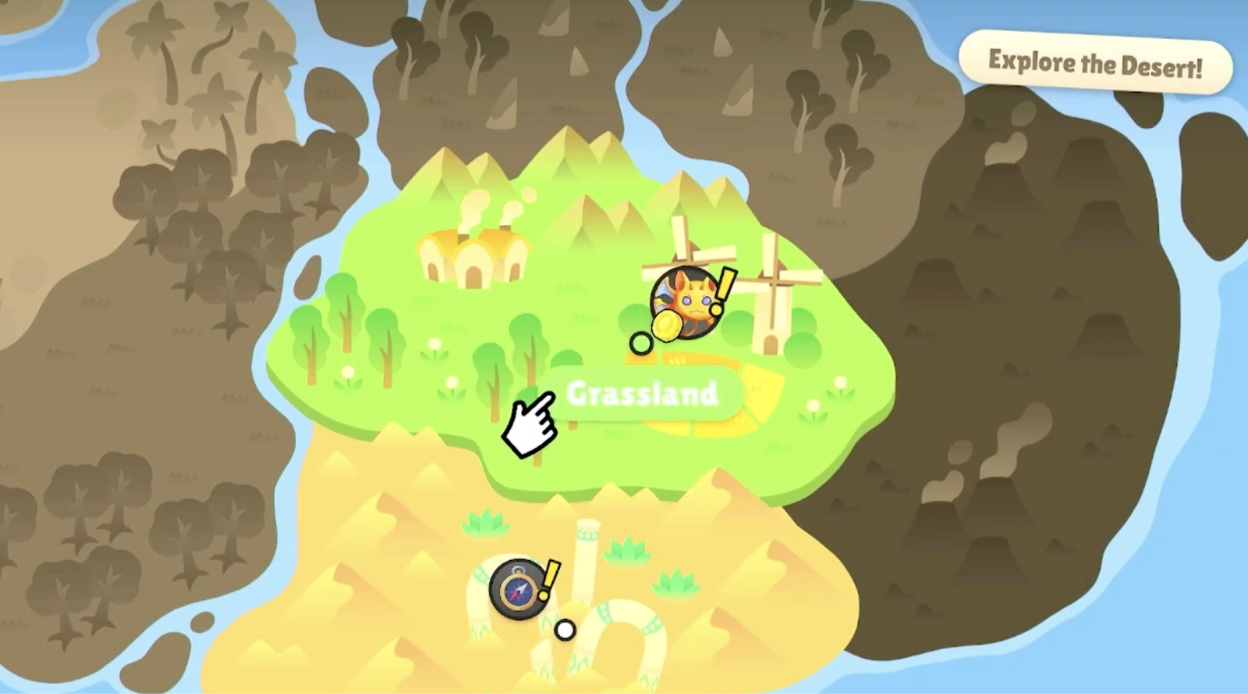
Q: I'm working on the Sword Slash Adventure quest... where can I find the Grassland map?
A: In the center, above the Desert. It’s the tutorial map.
Q: How do you get the 100 Sky Berries for the Unicorn Academy: Friendship Adventures quest?
A: You need to find and activate the Unicorn Academy game's Sky Berries mission. It's located in the West Field area of the map.
Q: The game says the Play Box is still getting tuned up. What is going on?
A: Please make sure that your Playground is connected to the internet. You can check this in your console’s settings.
Q: I don’t see the Winter Wonders event on my launcher. What should I do?
A: Make sure Playground is updated to the latest version, connected to Wi-Fi, and that you’re signed in with an active Play Pass. You should see the Winter Wonders game tile in the “Holiday Fun” row, just underneath “Top 10”.
We hope you enjoy this new Play Pass-exclusive event on Nex Playground. We can’t wait to hear all about your favorite quests or trophies, and maybe even see some of your beautiful snowy islands.
Looking for even more festive fun? Check out all the other holiday-themed updates you can play this December here. And have a very Happy Holidays!


